PCB Panelization: Panel Design, Separation & PCBA Checklist

Table of Content
- 1. What is a PCB panel, and why is it used?
- 2. V-scoring or routed tabs: what should you compare?
- 3. Review rails, alignment and assembly access together
- 4. Plan depanelization before placing sensitive components
- 5. Should different boards share one panel?
- 6. Compare cost per accepted board, not units per panel alone
- 7. Send a panel review that can become a build-ready quote
- 8. PCB panelization FAQ
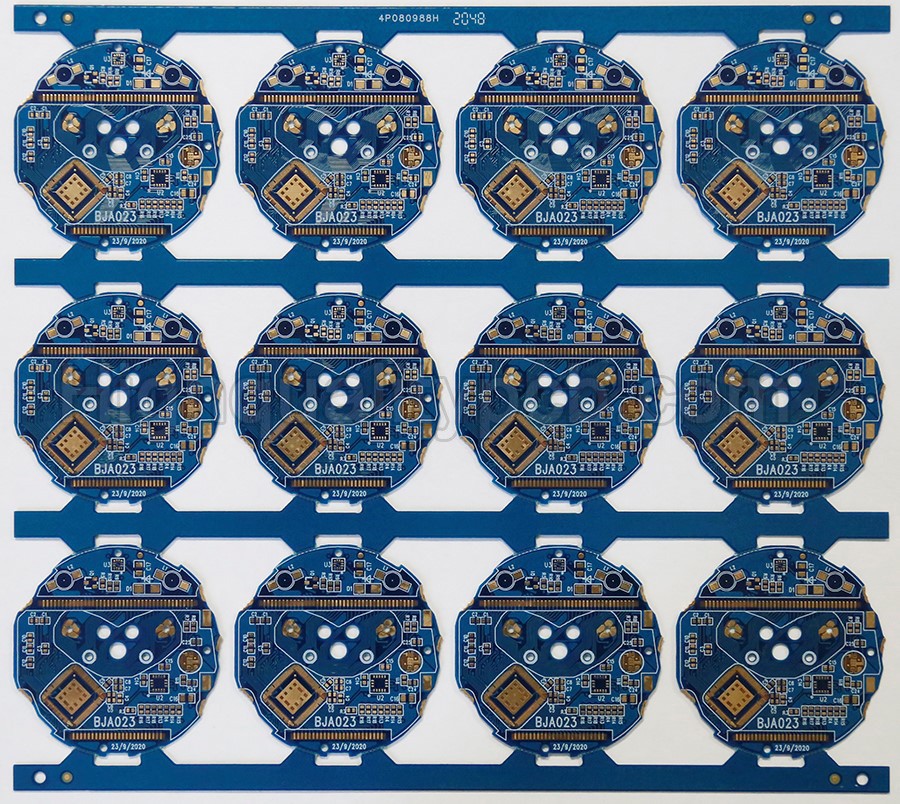
A PCB panel holds one or more circuit-board units in a larger manufacturing or assembly format. Panelization can make small boards easier to handle, support repeated SMT operations and organize production. The useful panel is the one that fits fabrication, assembly, inspection, testing and separation—not simply the layout containing the most boards.
How should you choose a PCB panel for a turnkey assembly order? Review the finished-board outline, component overhang, process rails, alignment features and depanelization method with the fabricator and assembler before releasing the panel drawing. Keep the single-board design and the approved panel revision linked. For a small-batch or high-mix order, also check whether combining products would create unnecessary material, variant or delivery constraints.
Preparing an order? Request a PCB fabrication and turnkey assembly review with your board files, BOM, quantities and proposed panel—or send the single-board files and ask for a panel proposal.
1. What is a PCB panel, and why is it used?
A panel is a temporary production format. Individual board units remain supported by the surrounding material, connecting tabs or scored sections until the planned separation step. The panel can provide handling edges and locations for tooling and alignment features that do not belong on the finished product.
Fabrication panel and assembly array are related but not necessarily identical. A fabricator arranges work to suit its manufacturing process; an assembler needs an array that fits its handling, placement, soldering and inspection route. Specify which format your drawing describes rather than assuming that the bare-board factory’s production panel is the format that will enter the assembly line.
- Handling: small or awkwardly shaped boards may be easier to process when retained in a suitable carrier or array.
- Repeated operations: an array can allow printing, placement and other steps to be organized around several units.
- Manufacturing utilization: an appropriate arrangement can reduce unused material, subject to the required rails, routing and processing constraints.
- Controlled release: board positions and identifiers can support agreed inspection, test and disposition records.
These are potential benefits, not a guaranteed cost or yield improvement. Panelization does not simplify the electrical circuit or correct an unsuitable layout. Confirm the complete process before treating a denser arrangement as an improvement.
2. V-scoring or routed tabs: what should you compare?
Choose the separation approach together with the board geometry and populated assembly. A drawing should distinguish a routed outline from a score line and show the connecting features that remain during processing. Do not rely on a screenshot or an unexplained silkscreen line as the complete manufacturing instruction.
| Approach | How units remain connected | Decisions before release |
|---|---|---|
| V-scoring | Grooves leave a residual section of material to retain the boards until separation. | Confirm score-path feasibility, residual thickness, alignment, component clearance and the supported separation process. |
| Routed tabs | Routing defines the outline while selected bridges retain each board in the array. | Confirm the routing tool and path, tab placement, support during assembly, removal method and acceptable remaining edge. |
| Perforated tabs / mouse bites | Drilled perforations in selected bridges help define the intended break region. | Review hole and tab geometry, removal access, component proximity and the finished-edge requirement. Perforations alone do not establish a low-stress process. |
On a phone, swipe the table within its frame. Keyboard users can focus the table region and use the arrow keys.
The supplier must confirm dimensions for the actual laminate, thickness, board outline and equipment. There is no single rail width, tab size or residual score thickness that should be copied into every order. Identify flush-fit edges, connector interfaces and enclosure surfaces where a remaining tab or rough edge could matter.
3. Review rails, alignment and assembly access together
- Start with the finished assembly envelope. Show board outline, maximum component heights and connectors or other parts extending beyond the board. Check both sides, including parts installed after reflow.
- Agree the handling format. Confirm the panel’s overall dimensions, processing orientation and the support required along the assembly route. A rail occupies real space; it must not conflict with the populated assembly.
- Define alignment and tooling features. Confirm fiducials, tooling holes, their reference system and any keepout requirements with the equipment and process owner. They serve different purposes and should not be substituted for each other without review.
- Check the process sequence. Include printing, placement, reflow, through-hole work and any secondary assembly. Ask whether a support or separation feature creates an access problem at a later step.
- Include inspection and test access. Identify test points, connectors, fixture access and the stage at which programming or functional testing occurs. An assembled panel and an individual finished board may require different fixtures.
- Release one coordinated package. Keep the panel drawing, board revision, BOM variants and placement data consistent. Record who approves the final panel and what must be rechecked after a change.
For alignment details, use our PCB fiducial guide. For the complete assembly handoff, see the PCB assembly drawing checklist. The panel review complements those documents; it does not replace them.
4. Plan depanelization before placing sensitive components
Separation is a mechanical operation performed on a board that may already contain components and solder joints. Bending and twisting can damage susceptible components, including multilayer ceramic capacitors. Review the component location, board support, tool access and separation direction as a system.
- Flag strain-sensitive parts near separation features and other areas where the board may flex.
- Review component-manufacturer handling guidance for the specific parts. Do not assume that a visually clean edge proves the populated assembly was unstressed.
- Agree the proposed equipment, support and cutting or separation sequence. Avoid treating uncontrolled hand breaking as the default production instruction.
- Define any necessary process validation, inspection and functional checks after separation. Test coverage and acceptance criteria belong in the build agreement.
- Specify the acceptable final outline, tab remnants, debris control, packaging and protection of connector contacts.
Moving a component or changing the separation method may affect other parts of the design. Have the design owner approve any layout change, and evaluate the actual assembly rather than applying a universal clearance number.
5. Should different boards share one panel?
A mixed-product panel can look efficient on a drawing while creating purchasing or scheduling problems. For low-volume, high-mix PCBA, evaluate how the units will be ordered, populated, tested and delivered—not only how tightly the outlines fit.
Illustrative planning example: a panel contains one Controller A and one Interface B. The order needs 60 assemblies of A and 20 of B. Fully populating 60 identical panels would produce 60 of each design, leaving 40 additional B assemblies. Compare that with separate arrays or a clearly controlled partial-population plan. This is a fictional quantity example, not a customer case or a cost prediction.
Check whether the products share material readiness, soldering requirements and release dates. Record which BOM and placement file belongs to each position, how variants and DNP parts are identified, how unpopulated positions are handled, and how each finished unit is traced and accepted.
A mixed panel may be appropriate when the production requirements align. Separate panels may offer more flexibility when demand ratios, component availability or delivery dates differ. Discuss the intended order pattern through our low-volume, high-mix assembly service.
6. Compare cost per accepted board, not units per panel alone
Ask for a comparison based on the same BOM, finished quantity, inspection scope and delivery requirement. More units per panel can change handling and utilization, but routing, tooling, support, test preparation, separation and excess assemblies also affect the order.
| Item | Provide or confirm | Why it matters |
|---|---|---|
| Board identity | Single-board files, outline, thickness, approved revision and variants. | Prevents a panel proposal from being based on the wrong board or build configuration. |
| Assembly envelope | Top/bottom placement, component heights, overhang and secondary-assembly details. | Connects the panel outline to actual handling, processing and separation access. |
| Panel responsibility | Customer-approved panel file, or a request for a supplier proposal; identify the approver. | Avoids two parties changing the array independently. |
| Quantities and mix | Finished boards required for each design or variant, pilot quantity and expected repeat orders. | Separates a panel count from the customer’s required finished-unit count. |
| BOM and procurement | Full MPNs, approved alternatives, DNPs and customer-supplied material. | Reveals material constraints that a geometrically efficient panel cannot solve. |
| Inspection and tests | Acceptance requirements, programming, test access and fixtures, including separation-stage requirements. | Defines what is included in an accepted assembly rather than comparing placement alone. |
| Delivery format | Panels or separated boards, edge quality, packaging, target date and destination. | Clarifies the final work and shipment scope used in the quote. |
If only fabrication is required, state that explicitly. For a full build, include panel preparation in the turnkey PCB assembly scope. Price and lead time should be confirmed against the actual files and material situation.
7. Send a panel review that can become a build-ready quote
Plan the PCB, BOM and assembly route together
OrinewPCB focuses on one-stop PCB assembly, including small and medium batches and high-mix projects. Share your single-board design or proposed panel, released BOM, required finished quantities and target date. Ask us to identify panel, sourcing and test questions before production.
We supply and use 100% new, original genuine electronic components for our component procurement and turnkey PCBA work. Cooperation with manufacturers and distributors supports project-specific sourcing options; exact MPN availability, price and delivery must be confirmed in the quotation. Identify any customer-supplied material separately.
A useful opening message: “Please review a panelized full-turnkey build for [board/revision], [quantity per design or variant], with [single-board files/proposed panel], [BOM status], [test scope] and [required delivery format]. Please confirm the proposed panel and separation plan before release.”
Request a Turnkey PCBA Panel Review
For the brand’s broader manufacturing service, visit OrinewPCB assembly services. Need components only? Use our electronic component sourcing directory.
8. PCB panelization FAQ
Is every PCB required to be panelized?
No. The need depends on board dimensions, shape, handling and the planned fabrication and assembly route. Some designs can be processed individually; others benefit from an array or suitable support. Ask the supplier to review the actual board.
Can I send single-board files instead of an approved panel?
Yes. Identify the files as a single-board design and request a panel proposal. Confirm who approves the panel, the required finished-board quantity, separation method and delivery format before production.
Does a larger panel always reduce assembly cost?
No. Utilization and repeated operations are only part of the quotation. Equipment compatibility, support, processing, separation, tests and excess production can offset a denser arrangement. Compare the same finished quantity and acceptance scope.
Are V-scoring and mouse bites interchangeable?
No. They use different connecting features and separation approaches. Board geometry, component proximity, final-edge requirements and equipment must be reviewed for the selected process. Do not replace one with the other without an approved drawing change.
Can several PCB designs share one assembly panel?
Potentially, if their production requirements are compatible. Check demand ratios, BOM variants, process conditions, material readiness, testing and release dates. A mixed panel is not automatically the most economical choice for a high-mix order.
Should programming and functional testing happen before or after separation?
The project determines the sequence. Fixture access and panel-level programming may favor one stage, while final mechanical handling or product verification may require later checks. Define the stage, coverage and acceptance criteria before the build.
Related Posts
ORINEWPCB · PROJECT SUPPORT
Contact Us
Discuss your PCB assembly project with our team.
FREE QUOTE
Plan your turnkey PCBA build.
Share your quantity and requirements. Add Gerber files and a BOM when ready.
Files are optional for an initial discussion. Include any assembly, sourcing or testing requirements in your message.