PCB Programming: Firmware Release & Production Checklist
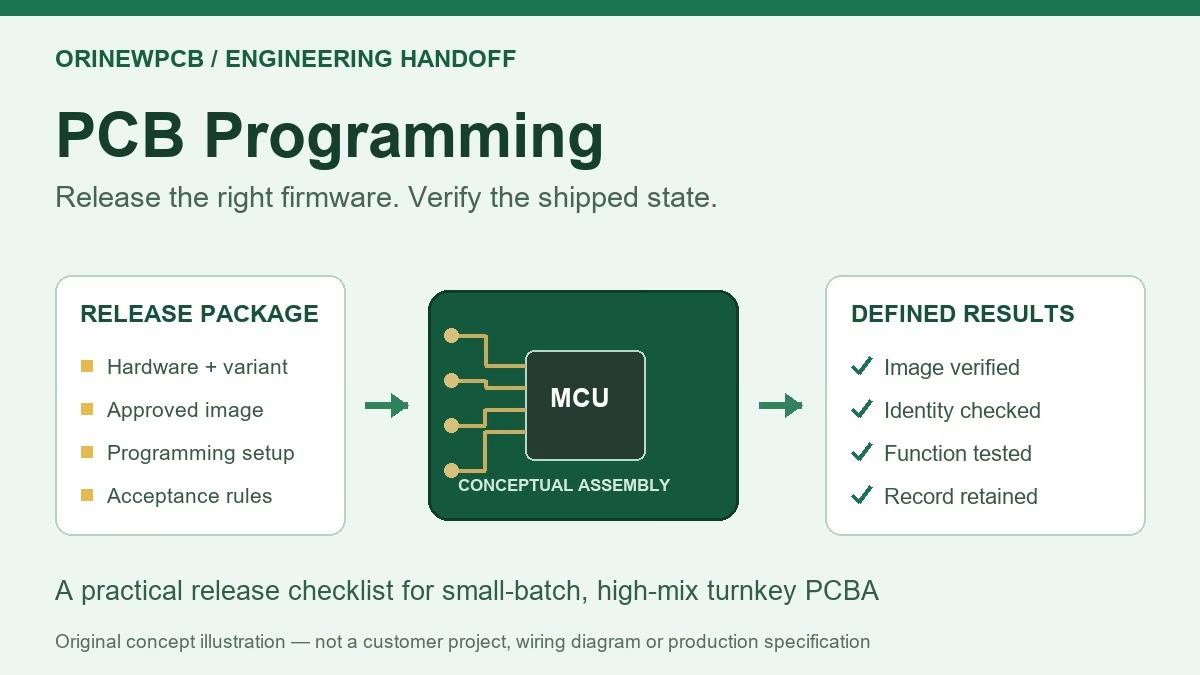
Table of Content
ENGINEERING & PROCUREMENT · TURNKEY PCB ASSEMBLY
Quick answer: PCB programming usually means loading firmware into a programmable component on an assembled circuit board. Before an assembler can quote a repeatable process, release the exact device and board variant, approved firmware files, programming interface, memory and configuration instructions, and acceptance checks. A successful download does not establish that the finished product works.
For a small-batch, high-mix build, the expensive mistake is often a mismatch: the right PCB receives the wrong firmware, a fixture cannot reach its programming pads, or a programmed board leaves without the required functional check. These problems start in the handoff package, before the first production unit is connected.
This guide explains what hardware engineers and product managers should prepare for turnkey PCB assembly with programming requirements. It focuses on a manufacturing handoff, rather than teaching software development or supplying a universal pinout. Confirm the device-specific procedure and the supplier’s supported scope for your project.
1. What does PCB programming include?
The bare PCB itself is not normally the item being programmed. Firmware or configuration data is written to a microcontroller, programmable memory, or another supported device on the assembly. A product may need more than one image: for example, application firmware plus a bootloader or external-memory content.
Programming, inspection and testing are separate activities. AOI can assess visible assembly features; it cannot establish which application version is running. A memory verification result addresses the programmed data under the chosen verification method. A functional test checks the board against a defined operating procedure and limits.
| Activity | Question it answers | What still needs a separate check |
|---|---|---|
| Firmware programming | Was the selected programming operation completed? | Correct build variant, configuration, boot behavior and product function. |
| Memory verification | Does the checked memory match the expected data or approved verification result? | Unverified regions, device-specific data and actual operating behavior. |
| Boot/version check | Does the application start and report the expected identity? | Required inputs, outputs, communications and performance limits. |
| Functional acceptance | Does this unit pass the agreed operating checks? | Functions and conditions outside the approved test coverage. |
A useful RFQ states which of these activities is required and what evidence the customer expects. “Program and test every board” needs a defined procedure before it becomes an executable production instruction.
2. Choose the programming route before fixing the build plan
Device support, access, variant count and expected repeat orders all affect the route. A quick laboratory method may be practical for engineering samples, while a repeat build may justify dedicated fixturing or a different programming setup. Quantity alone is not enough to select the process.
| Route | When to discuss it | Release questions |
|---|---|---|
| Program devices before placement | The exact device supports the proposed off-board process and the firmware can be fixed before assembly. | Who supplies the programming service? How are programmed MPNs/lots identified? What happens if firmware changes? |
| Program after assembly through a connector | A compatible programming interface is accessible on the assembled board. | What are the connector pinout, target voltage, power source, reset and boot conditions? Is access retained after later assembly? |
| Program through a contact fixture | Repeated batches or access constraints make a fixture worth evaluating. | Which drawing controls pad access and board support? Who designs, validates, owns and maintains the fixture? |
| Use a supported bootloader or update path | The device and released firmware support that route in the incoming state. | Is the bootloader actually present? What enables the mode? How are the application image and successful completion verified? |
Do not assume that a USB connector makes a board directly programmable. The device, boot mode, firmware and hardware must support the proposed path. Equally, a programmer’s compatibility with a device family does not establish compatibility with every exact device, memory layout or protection state.
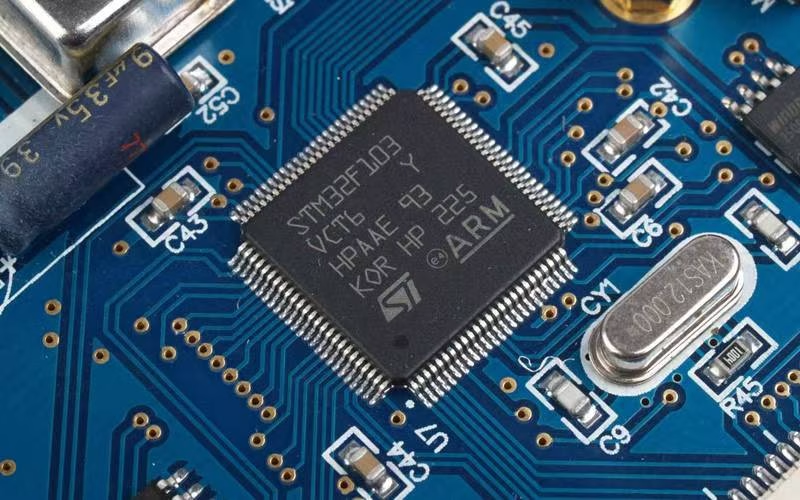
Confirm that the chosen tools and licenses are suitable for the intended production use. For example, ST’s current guidance distinguishes STM32CubeProgrammer development use from production programming and points production users toward appropriate partner solutions. This distinction should be resolved during process review, not after an order is scheduled.
3. Release a complete firmware package
Send a controlled package with a short manifest. The person programming the board should not have to choose between attachments called “final”, “latest” and “new final”. Keep the approved image, configuration instructions and work instruction tied to a release identifier.
| Item to release | What to include | Decision it prevents the operator from guessing |
|---|---|---|
| Hardware identity | Assembly number, PCB revision, BOM revision, build variant and exact target device ordering code. | Which physical boards are eligible for this release? |
| Approved images | File names, firmware versions, release ID and expected file hashes using the agreed algorithm. | Which exact files were approved? |
| Memory instructions | Destination for each image; required loader or configuration; areas to preserve and permitted erase scope. | Where should data be written, and what must remain intact? |
| Programming setup | Supported programmer, tool/project version, interface, connection drawing, power and reset/boot sequence. | Which approved setup should the supplier reproduce? |
| Configuration and unique data | Approved device settings; serial allocation or calibration data if required; ownership and access responsibilities. | Which values are common, which vary by unit, and who authorizes them? |
| Acceptance and exceptions | Verification method, boot/version response, functional-test procedure, records, failure hold and change approval. | What is a pass, and what happens after a failure or revision change? |
File extensions alone do not define a safe programming job. A raw binary needs its intended destination specified; address-bearing formats still need to match the target memory map and approved tool setup. If several images are required, document all destinations and the sequence. Identify external-memory loaders where applicable.
A release-file hash identifies the approved input file. It does not replace verification of the device’s programmed memory. If serial numbers or other per-unit data change the image, define how the verification method handles those approved variable regions.
Use the same revision discipline as the PCB assembly drawing. State the relationship between hardware, BOM variant and firmware explicitly, even when the copper layout is shared.
4. Check physical access, power and process sequence
A diagram of the interface is more useful than the instruction “use SWD”. Identify the signals required by the selected device and setup, connector orientation, ground, voltage reference, reset and boot controls where needed. SWD, JTAG and device bootloaders are different interfaces; do not interchange their pin assignments or assume a universal programming voltage.
- Confirm the power source. State whether the board or the programming setup supplies power, and define the approved power-up and shutdown conditions. Do not assume the voltage-reference connection is a power output.
- Show actual access. Provide the relevant assembly view and keep-outs. Include fixture approach, board support and any connector, heatsink or enclosure that could obstruct the contacts.
- Review the assembled electrical environment. Ask the hardware owner to review loading, shared signals, reset behavior and other circuitry that may affect the interface.
- Place programming in the process sequence. Confirm access before coating, potting or final enclosure operations, or provide an approved access arrangement for the later stage.
- Separate factory and application images if used. Define whether a temporary test image must be replaced and how the final shipped state is checked.
For coated assemblies, coordinate this review with the coating masking and keep-out drawing. A programming pad that becomes inaccessible is a process-planning issue, not something to leave for the operator to improvise.
5. Agree on programming, verification and release gates
The following is a suggested handoff workflow. It does not replace the target-device documentation or prescribe the order of irreversible device settings.
- Confirm the released build. Match the board, fitted variant and target device to the approved package. Resolve conflicts before programming.
- Validate the setup on approved samples. Confirm access, tools, power, process timing and expected results. Record the approved setup before processing the remaining units.
- Run the approved programming job. Use the specified files, destinations, permitted erase operations and configuration. Stop if the device identity or initial state is unexpected.
- Perform the agreed memory verification. Retain the result and apply the defined treatment of variable data. A command completing without an error is not an interchangeable substitute for every verification requirement.
- Check the intended shipped application. Reset or power-cycle as specified, confirm the expected image identity and carry out the agreed functional acceptance procedure.
- Reconcile records and release the units. Separate accepted units from failures and pending work. Link the result to the build lot or unit identifier at the agreed traceability level.
Configuration, read protection and one-time-programmable settings need a device-specific, engineering-approved sequence. Some changes can restrict later access or affect recovery. Do not use a generic internet command as a production instruction, and do not let an operator choose protection settings to clear an unexpected error.
For secure provisioning, define the approved transfer method and responsibility for sensitive material separately. Do not put private signing keys or production credentials in an ordinary quotation attachment. Describe the requirement first so both teams can agree on the supported process.
6. Example: two firmware variants on one PCB revision
Fictional planning example: a team orders 60 controller assemblies, split between two product variants using PCB revision C. These are example quantities and file names, not an OrinewPCB customer case or an instruction to program a real device.
| Release field | Variant A: 40 units | Variant B: 20 units |
|---|---|---|
| Hardware and BOM | PCB C; assembly A; approved BOM A3. | PCB C; assembly B; approved BOM B2. |
| Application file | controller_A_2.1.0.hex; approved file hash in manifest. | controller_B_2.1.0.hex; separate approved file hash. |
| Per-unit identity | 40 identifiers from the customer’s approved allocation. | 20 identifiers from a separate approved allocation. |
| Acceptance response | Reports variant A and firmware 2.1.0; passes test procedure A. | Reports variant B and firmware 2.1.0; passes test procedure B. |
| Release evidence | Unit/lot mapping, programming and test results, failure holds. | Separate variant mapping and corresponding results. |
The control point is not just the total of 60 boards. It is the relationship between the physical variant, approved image, unique data and acceptance result. Mark the transition between variants in the work instruction, reconcile quantities and prevent pending or failed units from entering the accepted group.
If firmware changes after approval, identify the affected units and release a revised instruction. Define which units require reprogramming, what verification and functional checks must be repeated, and how the final shipping record distinguishes the approved state.
7. Specify useful records and a failure-hold process
Choose a traceability level that fits the product and commercial scope. Lot-level evidence and per-unit records are different deliverables. If each unit needs a programming and functional-test record, state that in the quotation request and agree on the data fields and retention arrangements.
A practical proposed record includes build/variant, unit or lot ID, release ID, image identity, approved setup version, programming result, verification result, functional-test result, time or run reference, and any exception disposition. Ask the supplier to confirm which fields can be provided.
| Observed result | Review before repeating the process | Disposition to define |
|---|---|---|
| Cannot connect to target | Approved power, connector orientation, contact condition, device identity and reset/boot state. | Hold the unit; distinguish fixture/setup issues from board faults. |
| Programming or verification fails | Exact error, image/destination, target memory support, connection stability and allowed erase scope. | Follow the approved retry limit and engineering escalation; preserve the evidence. |
| Programming passes but application does not start | Required images, configuration, expected boot path and hardware compatibility. | Keep separate from accepted boards; investigate using the agreed procedure. |
| Wrong variant or duplicate identifier | Release mapping, identifier allocation and records for other affected units. | Contain the affected batch and approve a controlled correction and retest. |
Repeatedly erasing and retrying until a green indicator appears can destroy useful diagnostic information or alter data that should have been preserved. Define permitted recovery steps, retry limits and the person who can approve further work.
8. What affects programming cost and delivery?
Ask for a quote that separates setup or fixture work from recurring unit operations. Relevant inputs include the exact target device, image size and count, interface, access arrangement, variant changes, unique data, verification, functional-test coverage and required records. Do not assume a universal programming time or a fixed extra fee per board.
For small batches, engineering setup and approval can matter more than the download operation itself. For repeat orders, keeping an unchanged approved package and a maintained fixture may reduce avoidable requalification work; the supplier should confirm what can be reused.
OrinewPCB provides PCB fabrication, component procurement and turnkey assembly, with particular emphasis on small-to-medium batches and high-mix projects. Our component policy is to supply and assemble with 100% new, original genuine electronic components. Programming feasibility, supported tools, test scope, price and schedule are confirmed for the particular build.
Learn how the broader service fits together on the OrinewPCB brand website. For a manufacturing handoff, state your required delivered condition clearly: assembled only, programmed and verified, or programmed with an agreed functional acceptance test.
PCB programming FAQ
Does every PCB need programming?
No. The requirement depends on the components and the intended product. A bare board or an assembly without programmable devices may not require firmware. For assemblies that do, identify whether the devices arrive preprogrammed or require an approved programming operation.
Can a manufacturer program my assembled PCB?
Often this can be evaluated, but it is not automatic. Provide the exact device, released images, interface and access drawing, power/configuration instructions and acceptance requirements. Ask the supplier to confirm the device, tools, process and quoted scope.
Are Gerber files and a BOM enough for firmware programming?
No. They describe PCB manufacturing and components, but do not establish the firmware image, memory destination, programming setup or pass/fail procedure. Send a controlled programming package in addition to the manufacturing files.
Which is better: SWD, JTAG or a bootloader?
The answer depends on the exact device, hardware access, incoming state and approved process. Use a supported interface and documented connection. Confirm reset/boot requirements, the programmer’s device support and any restrictions after protection is applied.
Does firmware verification replace functional testing?
No. Memory verification checks the programmed data under the chosen method; functional testing checks defined operating behavior. Specify both separately when both are required for shipment.
Do small batches still need a formal firmware release?
Yes. A clear manifest, hardware-to-firmware mapping and acceptance procedure are useful even for a few units. High-mix work particularly benefits from explicit variant mapping and controlled changes.
Can I send an inquiry before the firmware is finished?
Yes. Mark the firmware and programming procedure as pending. Share the target device, intended interface, quantity, access information and desired delivered condition. An initial estimate can identify assumptions; production approval should use the agreed released package.
Request a turnkey PCBA and programming review
Send your Gerber/drill data or agreed PCB format, BOM, placement file, assembly drawing, build quantities and target delivery date. Add the exact programmable device, intended firmware release, programming access and required verification and functional-test scope. Identify pending files and decisions explicitly.
Copy this inquiry outline: “Please quote turnkey PCB fabrication, BOM procurement and assembly for [assembly/revision/variants], in quantities [prototype/batch]. Programming is required for [exact device]. Firmware and procedure are [released/pending]. Required shipped state: [programmed/verified/functionally tested]. Interface/access: [details]. Please identify setup, fixture, programming, test and record requirements separately, and flag any assumptions before production release.”
Request a Turnkey PCBA & Programming Review
Files are optional for the first discussion and can follow through the agreed channel. The quotation, supported process and delivery plan follow review of your actual project.
Related Posts
ORINEWPCB · PROJECT SUPPORT
Contact Us
Discuss your PCB assembly project with our team.
FREE QUOTE
Plan your turnkey PCBA build.
Share your quantity and requirements. Add Gerber files and a BOM when ready.
Files are optional for an initial discussion. Include any assembly, sourcing or testing requirements in your message.