Arduino vs. Raspberry Pi: Which One Should You Choose for Your Project?

Table of Content
“Should I choose Arduino or Raspberry Pi?” This is one of the most common questions among electronics hobbyists and beginners. But many don’t realize: Arduino and Raspberry Pi are not the same kind of device.
Arduino is a microcontroller platform – no operating system, runs as soon as power is on, specialized for precise hardware control.
Raspberry Pi is a mini computer – runs Linux, can do almost everything a PC can, but real-time control is weaker.
Beginners often get misled by specs – thinking that because Raspberry Pi has higher frequency and more memory, it is better. In reality, Arduino is irreplaceable when you need microsecond-level precise response; Raspberry Pi is the right choice when you need a graphical interface, network services, or image processing.
This article compares the two platforms from multiple angles: platform positioning, hardware architecture, development experience, real-time performance, power consumption, and ecosystem. It also provides typical use cases, explains how to combine both, and ends with an FAQ and summary to help you decide quickly.
1 Core Concepts – Two Different Computing Paradigms
1.1 What is Arduino?
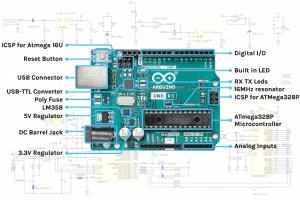
Arduino is not a single board – it is an open-source electronics prototyping platform consisting of hardware (various Arduino boards) and software (Arduino IDE and a rich library collection). It was born in Italy in 2005 to give designers and artists an easy-to-use tool for interactive hardware.
The heart of Arduino is a microcontroller (MCU) – a single chip that integrates a CPU, RAM, ROM, and I/O interfaces. The microcontroller does not run an operating system. Your code is burned directly onto the chip and starts executing the moment power is applied – no boot time, no background processes, no risk of system crashes.
A typical Arduino board (e.g., UNO, Nano, Mega 2560) usually has:
- Tens of general-purpose input/output pins (GPIO)
- Some pins support analog input (ADC)
- Some pins support hardware PWM (pulse width modulation)
- Communication interfaces: UART, I²C, SPI
- A few KB to hundreds of KB of program flash memory
- A few KB to tens of KB of SRAM
Although the specs look “low-end”, this simplicity gives Arduino its real-time performance, low power consumption, and high reliability.
1.2 What is Raspberry Pi?
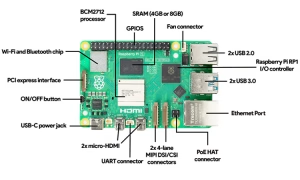
Raspberry Pi was launched by the Raspberry Pi Foundation in 2012 to promote computer science education. Unlike Arduino, Raspberry Pi is a single–board computer (SBC) – a complete computer on a single circuit board. It includes a CPU, GPU, RAM, USB controller, network controller, video outputs, and it runs a full operating system (usually Linux, such as Raspberry Pi OS).
A typical Raspberry Pi Model B series:
- Multi-core 64-bit ARM processor (1.2 GHz and above)
- Hundreds of MB to several GB of RAM
- microSD card as storage (8 GB to hundreds of GB)
- Full-size HDMI, 3.5 mm audio jack
- Ethernet, Wi-Fi, Bluetooth
- Multiple USB ports
- 40-pin GPIO header
Once powered on, a Raspberry Pi works just like a normal computer: you can log into the desktop or command line, install software packages, run Python scripts, set up a web server, or even compile the kernel. GPIO control is just one of its many features, and it is done through the operating system drivers.
1.3 One–sentence summary
- Arduinois a real-time hardware controller – single-task, precise, reliable, low-
- Raspberry Piis a miniature general-purpose computer – multi-task, multi-function, higher complexity, higher power.
2 Hardware Architecture and System Comparison
2.1 Processor and System Complexity
| Aspect | Arduino Platform | Raspberry Pi Platform |
| Core chip | Microcontroller (MCU) | Microprocessor (MPU) |
| Typical architecture | 8-bit or 32-bit ARM Cortex-M | 64-bit ARM Cortex-A |
| Clock frequency | 16 MHz – 480 MHz (depends on model) | 1.2 GHz – 2.4 GHz |
| RAM | 2 KB – 1 MB | 512 MB – 8 GB |
| Storage | Built-in Flash (32 KB – 2 MB) | microSD card / eMMC (8 GB+) |
| Operating system | None (bare metal) | Linux (Raspberry Pi OS, Ubuntu) |
Key differences:
- Arduino programs run directly on bare metal -no scheduler interference.
- Raspberry Pi programs run on top of Linux -affected by process scheduling, interrupt latency, and memory management.
2.2 Real–Time Performance
This is one of the most fundamental differences.
Arduino provides deterministic real–time performance. Because there is no operating system, the execution time of each instruction is known and predictable. You can precisely control when a pin toggles – accuracy can reach microseconds or even sub-microseconds (hundreds of nanoseconds), depending on clock speed. This is essential for tasks like driving WS2812 addressable LED strips (timing requirement 1.25 µs), generating accurate PWM signals for servos (period ~20 ms, pulse width 1-2 ms), or reading ultrasonic sensor echo pulses (10 µs range).
Raspberry Pi’s real–time performance is not deterministic. Linux is a general-purpose time-sharing operating system that schedules all running processes fairly. Even if you write a high-priority real-time thread, you cannot guarantee that it will execute at an exact moment – the kernel might be handling network interrupts, swapping pages, or running background services. In practice, GPIO toggling jitter on a Raspberry Pi is usually tens to hundreds of microseconds, which is unacceptable for some applications.
- Note: You can improve real-time performance on Raspberry Pi by applying the RT-PREEMPT patch or using bare-metal programming (e.g., the Circle library), but these approaches are beyond most beginners.
2.3 Power Consumption and Power Supply
Arduino: Typical operating current is tens of mA (power < 0.5 W). Can be powered via USB, through the Vin pin (7-12 V DC), or directly with a 5 V regulated supply. Many Arduino boards also support deep-sleep mode (a few microamps). For IoT sensor nodes, a single coin cell or 9 V battery can last months.
Raspberry Pi: Typical operating current is 600 mA to 1.5 A (power 3 W to 7.5 W). Requires a stable 5 V power supply (official recommendation 5 V/2.5 A or higher). Although it can theoretically run from a power bank, a typical 10,000 mAh power bank will only last a few hours. Raspberry Pi has no hardware deep-sleep mode (unless you cut power), so it is not suitable for long-term battery-powered deployments.
2.4 Boot Time and Reliability
Arduino: The program starts executing within tens of milliseconds after power-on. No operating system means no system crashes, no driver conflicts, and no file system corruption. Excellent for 24/7 unattended operation in industrial or outdoor environments.
Raspberry Pi: From power-on to Linux login typically takes 20 seconds or more (even after optimization it is several seconds). Improper power-off can corrupt the SD card file system, requiring regular backups or a read-only rootfs. Its stability is lower than Arduino in harsh environments with vibration, high humidity, or industrial electromagnetic interference.
2.5 Input / Output Capabilities
- GPIO count and type
Typical Arduino boards provide 14-54 digital I/O pins, some of which support PWM, and some support analog input (dedicated ADC). The I/O voltage is usually 5 V (3.3 V versions also exist).
Raspberry Pi’s 40-pin GPIO header is almost all digital 3.3 V logic. By default, only GPIO 18 and GPIO 19 support hardware PWM (high accuracy, no jitter); PWM on other pins is software-simulated, with lower accuracy and stability. Also, Raspberry Pi has no analog input pins – you need an external ADC chip.
- Other interfaces
Arduino: Usually provides UART, I²C, SPI; advanced models may have CAN, USB Host, etc. Overall, the interface set is simple.
Raspberry Pi: Besides GPIO, it offers full USB, HDMI, Ethernet, Wi-Fi, Bluetooth, CSI camera interface, and DSI display interface. These allow you to directly connect a keyboard, mouse, monitor, and camera – no extra converters needed.
3 Software Development and Programming Experience
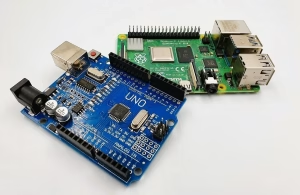
3.1 Arduino Development: Minimalist Embedded C++
The design philosophy of the Arduino IDE is “let anyone blink an LED in 15 minutes.” You only need to write two functions:
- setup()- runs once at power-on, used to initialize pins, serial port, etc.
- loop()- runs repeatedly, contains the main logic.
- Built-in functions like pinMode(), digitalWrite(), analogRead(), and delay()hide low-level register operations. For most starter projects, you don’t even need to know what “interrupts” or “memory allocation” are.
Arduino supports standard C/C++ and can embed assembly. The rich collection of open-source libraries makes it extremely easy to drive sensors, displays, and motor drivers – often just #include <SomeLibrary.h>.
3.2 Raspberry Pi Development: Full Linux Programming Environment
Developing on a Raspberry Pi is exactly like developing on a normal computer. You can:
- Use any language: Python (most popular), C/C++, Java, Node.js, Go, etc.
- Control GPIO with the GPIOlibrary (Python) or libgpiod (C).
- Do image processing with OpenCV and machine learning with TensorFlow.
- Use systemdto auto-start your program and cron for scheduled tasks.
- Log in remotely via SSH, develop with VSCode remotely.
However, controlling GPIO on Raspberry Pi essentially means accessing /sys/class/gpio or using a character device driver. Every call goes through the kernel layer, adding extra delay and resource overhead. This is much less efficient than Arduino’s direct register manipulation.
3.3 Learning Curve Comparison
Arduino: Suitable for complete beginners and non-CS backgrounds (artists, industrial designers, middle-school students). You don’t need to understand operating systems, the command line, or environment variables. The only hurdle is basic C++ syntax – and many tutorials let you skip that by copying code.
Raspberry Pi: Suitable for users with some programming experience who are willing to learn Linux. You must overcome the command line, package management, file permissions, and Python environment setup. But once you master it, you get a full computing platform, far more powerful than Arduino.
A rule of thumb: If you have never written a line of code, start with Arduino. If you know Python but no hardware, Raspberry Pi will get you into hardware quickly. If you want to become a professional embedded engineer, learn both.
4 Project Selection Guide
4.1 Typical Scenarios for Choosing Arduino
| Scenario | Reason |
| Precise control of servos, steppers, DC motors (PWM) | Needs stable, jitter-free PWM |
| Driving WS2812 / NeoPixel LED strips | Needs microsecond-level data timing |
| Reading high-speed pulse sensors (hall effect, ultrasonic) | Needs hardware interrupts and microsecond response |
| Battery-powered portable device or IoT sensor node | Very low power, can sleep for months |
| Industrial environment / long-term outdoor deployment | No OS, high reliability |
| Mass production (tens to thousands of units) | Low cost (MCU chip only a few dollars) |
| Learning embedded low-level principles | Directly work with registers, interrupt vectors, timing diagrams |
4.2 Typical Scenarios for Choosing Raspberry Pi
| Scenario | Reason |
| Need a graphical user interface (GUI) or touchscreen | Raspberry Pi supports HDMI and DSI displays, can run QT, Kivy, etc. |
| Computer vision (face recognition, object detection, QR code) | Needs Linux + OpenCV + camera driver |
| As a home server (NAS, Pi-hole, Home Assistant) | Full network stack and software package ecosystem |
| Running web services (REST API, database, MQTT broker) | Can install Nginx, MySQL, Node-RED |
| Machine learning inference (TensorFlow Lite, Edge TPU) | Needs large memory and Linux driver support |
| Media player (Kodi, RetroPie) | Hardware video decode and audio output |
| Rapid prototyping before porting to another Linux platform | Software needs almost no modification |
4.3 Gray Areas Where Both Could Work
Some projects can be done with either, but the choice depends on specific constraints:
- Simple data collection + upload to cloud:
If sampling rate is low (e.g., once per minute) and WiFi is available, Raspberry Pi can quickly run a Python MQTT script. But if you need many nodes running on batteries, Arduino + ESP8266 or a pure ESP32 is better.
- Robot main controller:
A small obstacle-avoiding robot can be built with Arduino + sensors + motor driver. But if you need SLAM (mapping), path planning, or vision recognition, Raspberry Pi is necessary.
- Environmental data logger:
If you don’t need real-time upload, only local logging to an SD card, both can work. Arduino has lower power but limited storage; Raspberry Pi uses more power but can store huge amounts of data and run analysis scripts on the device.
4.4 An Important New Player: Raspberry Pi Pico
In 2021, the Raspberry Pi Foundation released the Raspberry Pi Pico – not a Linux computer, but a microcontroller board based on their own RP2040 MCU, priced at only $4. Pico belongs to the same category as Arduino (microcontroller platform), supports C/C++ and MicroPython, and outperforms most 8-bit Arduino boards.
So, how to choose between Pico and Arduino?
- In terms of hardware specs, Pico is stronger (dual-core 133 MHz, 264 KB RAM, 30 GPIO).
- In terms of ecosystem, Arduino has over a decade of libraries and tutorials -much broader coverage.
- For new projects: if your sensor already has a MicroPython driver library, Pico is a good choice. If you need stable 5 V logic levels or a huge amount of existing Arduino code, Arduino is still better.
But no matter what, the appearance of Pico does not change the fundamental difference between a microcontroller and a Linux computer. Your decision still depends on whether your project needs an operating system.
5 The Best of Both Worlds – Arduino + Raspberry Pi Together
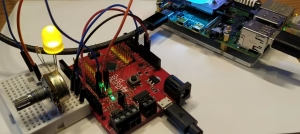
5.1 Why Combine Them?
Many real-world projects need both “precise real-time control” and “complex computation / networking.” For example:
- Quadcopter drone:Flight controller needs microsecond-level attitude calculation and motor control (Arduino), while also needing video streaming and ground-station communication (Raspberry Pi).
- Smart factory robotic arm:Joint servos need high-precision real-time closed-loop control (Arduino), while also needing PLC logic, HMI touchscreen, and MES connection (Raspberry Pi).
- Home security robot:Chassis motor control (Arduino), vision navigation and face recognition (Raspberry Pi).
By combining them, you let each component do what it does best.
5.2 Typical Architecture and Communication Methods
The most common architecture:
- Arduino as a peripheral controller– reads sensors, drives actuators.
- Raspberry Pi as the main brain– runs high-level algorithms, user interface, cloud communication.
- The two communicate via UART, I²C, SPI, or USB virtual serial port.
You can define your own communication protocol: for example, Raspberry Pi sends “MOTOR 150”; Arduino parses it and outputs the PWM value to a motor. Arduino periodically sends “TEMP 23.5”; Raspberry Pi receives it, stores it in a database, and displays it on a web page.
For more advanced applications, you can use ROS (Robot Operating System), making Arduino a ROS node (via rosserial protocol) and Raspberry Pi the ROS master.
5.3 Hardware Connection Precautions
- Voltage level matching:Most Arduinos use 5 V logic, while Raspberry Pi GPIO is 3.3 V. Direct connection may damage the Pi. Use a level shifter (or resistor divider) for bidirectional communication.
- Common ground:Both boards must share GND.
- Power supply:If the Raspberry Pi powers the Arduino through USB, make sure the Pi’s power supply has enough capacity (better to power them separately).
6 FAQs
Q1: I’m a complete beginner. Should I learn Arduino or Raspberry Pi first?
A: Start with Arduino. Its development flow is simple, the feedback is immediate, and the hardware barrier is low. You can make an LED blink in 30 minutes – that sense of achievement is crucial for beginners. Raspberry Pi requires learning Linux commands, system configuration, and programming languages at the same time, which can be frustrating.
Q2: Can Raspberry Pi completely replace Arduino?
A: No. For applications that require real-time control, low power, low cost, and high reliability, Raspberry Pi cannot replace Arduino. Even the Raspberry Pi Pico is a microcontroller board – it is in the same category as Arduino, not a replacement.
Q3: Can Arduino run artificial intelligence algorithms?
A: Only very simple models. For example, on the Arduino Nano 33 BLE Sense you can use TensorFlow Lite Micro for voice wake-word detection or gesture recognition. Complex image recognition and natural language processing must run on a Raspberry Pi or a more powerful computer.
Q4: Can Raspberry Pi use Arduino shields?
A: Not directly. Arduino shields have a different pinout and use 5 V logic, while Raspberry Pi GPIO is 3.3 V. You can buy an “Arduino Shield to Raspberry Pi adapter board”, but a better approach is to use an Arduino for low-level control and communicate with the Raspberry Pi over serial.
Q5: Which is better for product prototyping?
A: Use both. First, use Arduino to verify the basic functions of sensors and actuators. Then use Raspberry Pi to test network, UI, etc. If you eventually go to mass production, you may design a custom board with a microcontroller (instead of Arduino) and possibly remove the Raspberry Pi if Linux is not needed – or keep a Raspberry Pi Compute Module.
Q6: Which is harder to break, Arduino or Raspberry Pi?
A: Arduino is more rugged. Many Arduino boards tolerate 5 V logic, have over-current protection, and some have reverse-voltage protection. Raspberry Pi GPIO is fragile – 3.3 V over-voltage or a short circuit can easily destroy the SoC. Beginners should start with Arduino to learn basic circuit safety.
Q7: Which Arduino / Raspberry Pi model should I buy?
A: For Arduino beginners, buy Arduino Uno R3 (or a compatible clone) – it has the most tutorials and shields. For advanced users, Arduino Nano (small size) or Mega 2560 (more I/O). For Raspberry Pi beginners, Raspberry Pi 3B+ or 4B (2GB version) – good balance of performance and cost. If you don’t need a desktop environment, Raspberry Pi Zero 2 W is smaller and cheaper (but less powerful).
7 Summary
Arduino and Raspberry Pi are not competitors – they complement each other:
- Arduino:Real-time hardware control expert – low power, high reliability, easy to learn. Suitable for motor control, sensor acquisition, battery-powered devices, industrial environments.
- Raspberry Pi:Miniature general-purpose computer – feature-rich, strong ecosystem. Suitable for image processing, web services, machine learning, media centers.
When choosing, don’t just look at specs. Ask three questions:
(1)Need microsecond-level real-time control? → Choose Arduino (or another microcontroller).
(2)Need a graphical interface or network? → Choose Raspberry Pi (or another single-board computer).
(3)Need both? → Combine them.
Don’t waste time on “which platform is better.” Good makers and engineers choose the right tool for the job. When you master both Arduino and Raspberry Pi, you gain full-stack ability – from low-level hardware to high-level software – something many professional embedded engineers aim for.
Now, start your project! 🚀
As part of the same trusted team, we are excited to introduce our brand: OrinewPCB for faster, high-quality One-Stop PCB assembly services.
Related Posts
ORINEWPCB · PROJECT SUPPORT
Contact Us
Discuss your PCB assembly project with our team.
FREE QUOTE
Plan your turnkey PCBA build.
Share your quantity and requirements. Add Gerber files and a BOM when ready.
Files are optional for an initial discussion. Include any assembly, sourcing or testing requirements in your message.